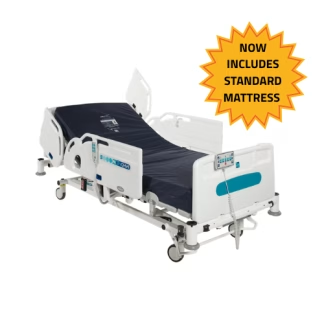
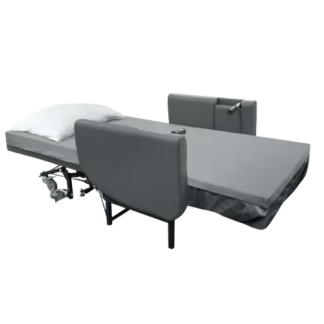
A homecare hospital bed is a hospital bed which can be used in a home or residential setting whilst still retaining the functionality of a hospital bed. These are powered beds which allow for adjustable back rest, leg rest and in some cases knee lift functions. They have been developed to meet the requirements of both users and carers alike. In some cases these beds have wooden or metal side rails to stop the user from falling out of bed.
Click below to learn more about Homecare Hospital Beds or view our wider range of Care Beds.
Why might I need a Homecare Hospital Bed?
Rental homecare hospital beds are often the right choice for those who have been discharged form hospital but still require the care and support that a hospital bed can provide. These for-hire beds are suitable for use at home whilst still retaining their hospital functionality. When palliative care is required at home, these beds help to make the process as smooth as possible. Being powered, hospital homecare beds allow for adjustments to be make to the back, leg and knee rests so the user has optimum comfort.
Where can I use a hire Homecare Hospital Bed?
Our range of rental homecare hospital beds are designed specifically for use in the home and in care environments to make the patient’s time in them as comfortable as possible. Hiring a homecare hospital bed on a short or long-term rental plan is a cost effective way to ensure patient comfort and safety.
Is a Homecare Hospital Bed right for my needs?
If you’re caring for somebody who requires a specialist bed which can be adjusted to suit the needs of the patient as well as suiting the needs of the carer. Some of the beds in this also category have metal or wooden side rails to stop the user from falling out of bed. For-hire homecare hospital beds are ideal for those users who may require additional functionality from a bed when returning home from hospital or moving into a care environment.
Used to monitor number of Google Analytics server requests when using Google Tag Manager
1 minute
__utmx
Used to determine whether a user is included in an A / B or Multivariate test.
18 months
__utma
ID used to identify users and sessions
2 years after last activity
__utmt
Used to monitor number of Google Analytics server requests
10 minutes
__utmz
Contains information about the traffic source or campaign that directed user to the website. The cookie is set when the GA.js javascript is loaded and updated when data is sent to the Google Anaytics server
6 months after last activity
_gac_
Contains information related to marketing campaigns of the user. These are shared with Google AdWords / Google Ads when the Google Ads and Google Analytics accounts are linked together.
90 days
_ga
ID used to identify users
2 years
_ga_
ID used to identify users
2 years
_gid
ID used to identify users for 24 hours after last activity
24 hours
__utmb
Used to distinguish new sessions and visits. This cookie is set when the GA.js javascript library is loaded and there is no existing __utmb cookie. The cookie is updated every time data is sent to the Google Analytics server.
30 minutes after last activity
__utmc
Used only with old Urchin versions of Google Analytics and not with GA.js. Was used to distinguish between new sessions and visits at the end of a session.
End of session (browser)
_gali
Used by Google Analytics to determine which links on a page are being clicked
30 seconds
__utmv
Contains custom information set by the web developer via the _setCustomVar method in Google Analytics. This cookie is updated every time new data is sent to the Google Analytics server.
2 years after last activity
SourceBuster is used by WooCommerce for order attribution based on user source.
Name
Description
Duration
sbjs_first
Traffic origin information for the visitor’s first visit to your store (only applicable if the visitor returns before the session expires)
session
sbjs_first_add
Timestamp, referring URL, and entry page for your visitor’s first visit to your store (only applicable if the visitor returns before the session expires)
session
sbjs_current
Traffic origin information for the visitor’s current visit to your store
session
sbjs_current_add
Timestamp, referring URL, and entry page for your visitor’s current visit to your store
session
sbjs_session
The number of page views in this session and the current page path
30 minutes
sbjs_udata
Information about the visitor’s user agent, such as IP, the browser, and the device type
session
sbjs_migrations
Technical data to help with migrations between different versions of the tracking feature